|
The FindGift.com gift registry is a free service that will allow you to easily add
any gift, from
any store, for
any occasion to your gift registry.
Below, are a few of the common questions that we receive...
Starting a gift registry...
Buying a gift from someone's registry...
Other related questions...
 How do I sign-up to use your free gift registry service?
Our gift registry service is free for FindGift.com members.
You can click here to sign up
for a free FindGift.com member account. Signing up only takes about 2
minutes and you will quickly be on your way to adding gifts to your registry.
How do I mark an item as purchased on someone's gift registry?
Simply click on the "Mark as Purchased" button next to the item that you have purchased.
You will be asked to enter in a quantity and code word. This code word is
used to let you clear an item in the event that a mistake was made.
You can chose any code word you want. Optionally, you can also provide your name if you want
the registry owner to know who purchased it. You do not need to be a member with us
to mark off an item from someone's registry.
How do I clear/reset purchased item on someone's gift registry?
First make sure you are viewing the "Purchased" item list, then just click on
"Clear Purchase" button next to the item you want to clear. You will be asked
to enter your code word that you used when you had marked that item as purchased.
After entering your code word, just click on the "Clear Purchase" button.
This feature is only for the purpose of clearing marked purchases, or to update purchased quantity
shown on this person's gift registry.
If you want to return a gift or cancel a purchase that was made to receive a
refund, you will need to contact the merchant that sold you this product.
Are items automatically marked as purchased of the person's registry when they are purchased?
No. Since we provide the flexibility to purchase the registered item anywhere that you choose,
we have no way of knowing when a purchase has been made.
For example, you could decide to go to your local mall to purchase an item listed on the registry.
We would have no way of automatically tracking such a transaction.
After purchasing a gift off of someone's registry, you will need to come back
to their registry to mark it as purchased.
How do I purchase an item from someone's gift registry?
Many times the registered person/couple will include a link to the item that they want. Or, they
will list the name of the store where this item can be found. In these instances, you can click on the
"Buy Online" link or visit the store listed to make the purchase. Or, you can go anywhere to purchase
this item -- even your local mall.
FindGift.com does not sell gifts. The items you see on a person's (couple's) gift registry
are sold via 3rd party retailers. Purchases would take place on their websites, at their store, or at
any store you choose.
How can I add any gift, from any web site to my registry?
You can add any item from any website just by clicking on the "Add Items" link on the left in your
registry administration area. You have options to add items from a website link or by manually typing it in.
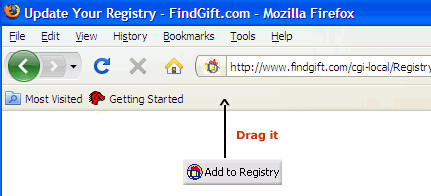
Or, if you like, you can take advantage of our free service that allows you to add a button
to your browser to add items into your registry while surfing the web (see below).
 |

|
Add any gift from any website to your registry with our toolbar button!
Step 1: Drag this button ->  to the bookmarks toolbar in your browser
Show me how
Step 2: Then just click on it from the website you see a gift you like. It's that easy!
Help! I don't see the Bookmark Toolbar
Go to View > Toolbars > Bookmarks Toolbars
|
|
 |
 |
|
 |
Can I add generic gift ideas that can be purchased at any store, online or off-line?
Yes. When adding items to your registry, you have options to add items "via link" or "manual" for online
and off-line gifts. You can type in the name of any item that you want, even
something generic like "Bird Bath". If you like, you can specify a store where this item can be found.
Or, you can enter in "Any Store".
How can I create additional gift registries?
You can now have multiple registries under one member account. To create additional registries/wish lists,
click on the "Add more Registries" link on the left within your registry management area.
How can I attach multiple names to the same gift registry?
Our registry allows multiple names to be attached to the same registry. This comes in handy for
weddings by allowing family members to search for either the bride, the groom, the parents of the bride,
parents of the groom, etc. and be able to find the couple's registry.
This also works well for a baby registry, where the baby's name has yet to be decided. The parents can
name the registry as "Baby Their-Last-Name" and then attach the names of both parents. That way, someone can
find the registry by searching either on "Baby Their-Last-Name" or via the name of either of the parents.
To do this, just click on "Edit Registry Names" link on the left menu within your registry management area.
In this same manner, existing names can be edited or deleted.
How can I password protect my registry?
If want to password protect your registry so that only guest who knows your password can view it, do the following:
Step 1: Click on the "Edit Registry Settings" on the left menu within your registry management area
Step 2: For "Visitor Access", select "Requires Password"
Step 3: Type in your password. (This is the password you will give to your guests to view your registry)
Step 4: Click "Update"
What is the difference between the gift registry and gift bookmarks?
The gift registry is a list of gifts that you want to share with other people so that they have an easy way
of getting gift ideas for you. Gift bookmarks can only be viewed by you and are there to help you to remember what
to get other people. If you see a good gift idea for someone else, you can bookmark it so that you can easily remember
how to find the gift again to purchase at a later time.
Can others change my personal gift registry information or email reminder service information?
Your information is password protected. So that only you have access to change your information.
If you suspect that someone has gained access to your password, you can change your password in your member
services area.
Why am I having trouble logging into my registry account?
Two possible reasons... The first of which is that you may not be using your correct username and password.
If you have forgot your username or password, you can request us to email
your password to you.
The second possibility is that your web browser is not configured to accept cookies. To access our member
service areas, your web browser must be able to accept cookies. To change your web browser settings, please
consult the help area for your web browser.
Does FindGift.com market personal information to third party vendors?
At FindGift.com, your privacy is important to us and we will not resell your personal information to 3rd parties.
Click here to review our privacy policy.
I have an online gift store. How can I add your gift registry service to my site?
Click here for more infomation.
I have a question that was not answered here.
email us your question. We'd be glad to help.
|